Update Your OpenAI Assistant to OpenAI Responses
OpenAI is retiring its Assistants API on 26 August 2026. Any Mition clients currently using an OpenAI Assistant will need to update their AI integration to the new OpenAI Responses API.
Mition has completed the development required to support OpenAI Responses, making the change straightforward for clients. You can follow the steps below to update your AI integration yourself, or the Mition team will complete the update for you on 25 August 2026 if it has not already been done.

Step 1: Open the AI Admin Settings
From your Mition website, go to:
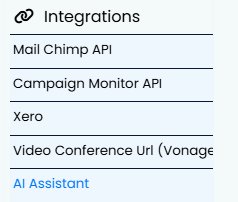
Admin Settings → Integrations → AI Assistant
Select the AI Assistants button, then open the relevant assistant to edit its settings.
Security note: Secret codes and other protected settings can only be viewed after completing two-factor authentication. Your authentication remains valid for one hour, and access to these settings is logged.
Step 2: Change the integration type
Locate the AI integration type and change it
from: ChatGPT (Assistant Beta v2 – legacy)
to: ChatGPT Responses
Step 3: Copy the tools into the whitelist
Select the button:
COPY THESE INTO THE WHITELIST
Previously, OpenAI controlled which tools your AI agent could use. With OpenAI Responses, these tools are managed directly within Mition.
Mition has collected the tools configured for each client’s existing Assistant over the past two months. Selecting this button automatically adds those tools to the whitelist field above, allowing your AI agent to continue accessing the appropriate Mition functions.
Step 4: Review and save
Check that the whitelist has been populated, then save the AI Integration Settings.
Your AI agent will now use OpenAI Responses.

This webpage was built with Mition