Usually, renewal of subscriptions will occur automatically. Every 4 hours (this was previously once a week), the system looks for subscriptions that expire today or earlier and attempts automatic renewal. As the renewal occurs on the last day of the users subscription, there is no gap where they do not have a subscription. Early Renewal allows a member to renew their subscription up to 11 months before its expiry date.
Early renewal is really a concept for those organisations who have fixed term subscriptions (ie 1st July to 30th June). But you can use Auto Reminders if you have members who have various start dates and end dates to create an "early renewal reminder" email and action.
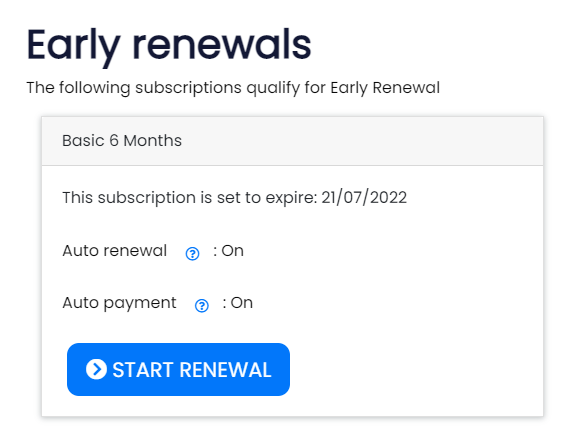
Some organisations like to request their member to renew their membership. Here we discuss some of the tools available to help you do this. There are several pages and emails you can send to have users renew early. There are two main reasons to do this, to request a donation at the time of renewal & the other popular reason is to try to promote revenue before the end of financial year, some members prefer to pay their fees before the end of the financial year so they can claim it in their tax return this year too.
You can renew a users subscription early manually; admins and staff can use the "Early Renewal" button on a users subscription to create the next years subscription (see Members > [select a member] > Membership > Subscriptions > [Edit subscription] > Click "Early Renewal" button. You can do this as long as the new membership start date is less than 11 months away. We do this to prevent the common mistake of using this function twice accidentally.
If you want to setup a subscription for future years.
If a subscription fails to renew 4 times, it is no longer attempted to be renewed.
Subscriptions are setup to renew and they can also attempt to take payment too. See subscriptions for more information.
There are two email template variables created to help you with your messaging.
Ideally send these to members whose subscriptions are going to expire in the next few months.
With donations: [WebsiteURL]/pay/earlyrenewal This will allow members to renew their subscription early and optionally donate to your organisation. Ideally send this to members whose subscriptions are going to expire in the next few months.
Without donations: [WebsiteURL]/pay/earlyrenewalsimple Allow member to renew their subscription early, but does not ask for a optional donation.
Donation page: [WebsiteURL]/pay/donation If you want to ask for a donation without actually having to do any renewals etc, you can do it with this page.
You can use these to send to members prior to your financial year end, or if you use rolling subscriptions (the subscription period starts when the user joins), use the auto reminders to send emails as their subscription is about to expire.
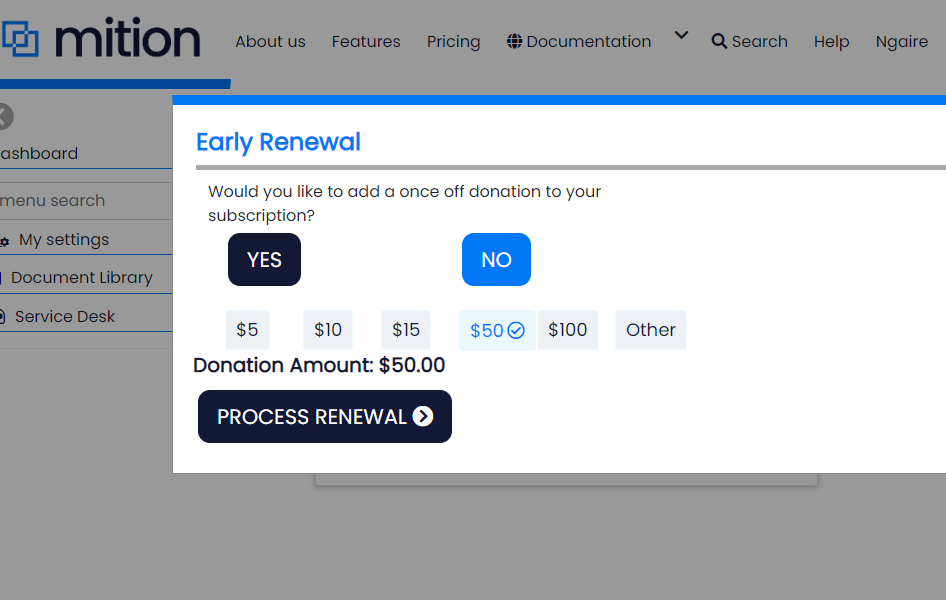
Our Early Renewal feature allows members to renew their subscription before it expires and, where permitted, upgrade or change to an eligible alternative subscription.
Before the renewal has occurred, staff can set a list of subscription codes eligible for upgrade / downgrade per subscription.
In Admin Settings > Members > Subscription Upgrade Path
Admins can control which subscription plans users can renew, upgrade, or downgrade to.
Each upgrade path is defined using Discount Codes.
How it works
Each row represents one subscription type.
Click +NEW
In the Discount Code field enter the discount code for the current subscription (e.g. Annual)
In Discount Codes Match enter a comma-separated list of discount codes this subscription can change to (e.g. Quarterly,Monthly)
Example
If you want users on Annual to be able to switch to Quarterly or CourseBook, enter:
- Discount Code:
Annual - Discount Codes Match:
Quarterly,CourseBook
Important Notes
- The user’s current subscription is always included automatically as a renewal option — you do not need to list it in the match box.
- Upgrade paths are one-way.
If you allow:Annual → Quarterlythat does not automatically allow:Quarterly → AnnualIf you want both directions, create both rows. - Discount codes must match your subscription setup exactly (spelling and punctuation matter).
Where users/members see this:
Individual Users can renew or switch plans via:
/pay/earlyrenewal (for no donation option)


/pay/earlyrenewalsimple (for donation option)
(up to 11 months before expiry)
Users who were given free subscriptions via their Company and are linked to the company cannot do early renewals, these will roll-over for free at the time of subscription ending automatically (providing the subscription is set to auto renew).

Creating a paywall
The Paywall check is implemented at the Subscription level. - The user has a subscription. - The subscription has the value “No access until paid” = True.
Read MoreThis webpage was built with Mition