Managing Self-Unsubscribe Subscriptions
Knowledge Base > Subscriptions > Self-Unsubscribe
Mition’s subscription system is designed to be flexible, supporting everything from paid memberships to free mailing lists. Each subscription is defined by a term and a price, which together determine its cost and renewal frequency. For organisations running opt-in communication channels—such as newsletters or interest groups—Mition now offers a streamlined way for users to manage their own participation via the Self-Unsubscribe feature.
This document outlines how administrators can configure subscriptions to allow users to unsubscribe themselves, suppress admin notifications, and optionally require workflow approval for renewals. These settings help reduce manual overhead while maintaining control over subscription behaviour.
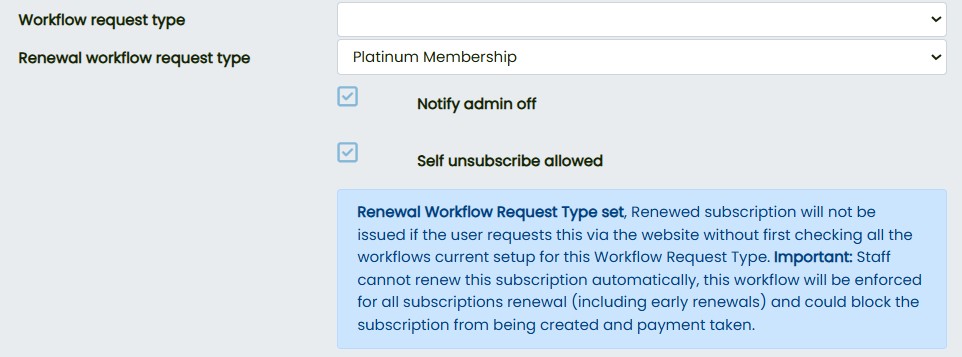
Self-Unsubscribe (isSelfUnsubscribeAllowed)
This setting enables users to cancel their own subscriptions without needing to contact support or an administrator.
Behaviour:
- If enabled, users will see an Unsubscribe button in their subscription details.
Clicking this button will:
- Immediately end-date the subscription.
- Prevent the subscription from renewing in future.
Use Case: Perfect for managing email lists, newsletters, or any opt-in group where users should be able to join and leave freely.
Admin Notifications (isNotifyAdminOff)
By default, Mition sends an email to the subscription owner or administrator whenever a new user signs up. This can be disabled to reduce inbox clutter.
Behaviour:
- If this flag is ticked, no email notification will be sent to the admin.
- Useful for high-volume signups where notifications are unnecessary or disruptive.
Use Case: Ideal for open-access subscriptions such as public mailing lists or promotional campaigns.
Renewal Workflow (RenewalWorkflowRequestTypeID)
Some organisations require manual validation or approval before a subscription can be renewed. This setting allows a workflow to be attached to the renewal process.
Behaviour:
- Instead of renewing automatically, Mition creates a workflow request.
- The renewal only proceeds once the workflow is approved.
- Applies to all renewal types, including early renewals.
Use Case: Recommended for professional memberships or certifications that require annual review
Example Scenarios
- Annual Membership Validation
→ Attach a renewal workflow to ensure each renewal is reviewed before approval. - Newsletter Subscriptions
→ Set the subscription term to lifetime and enable Self-Unsubscribe so users can opt in or out at any time. - High-Volume Public Signups
→ EnableisNotifyAdminOffto prevent admin inboxes from being flooded with signup alerts.
User Experience
- If Self-Unsubscribe is enabled:
→ Users will see an Unsubscribe button in their subscription settings.
→ Clicking it ends the subscription and disables future renewals. - If Self-Unsubscribe is disabled:
→ Users cannot cancel their own subscription.
→ Cancellations must be handled by an administrator. - If a Renewal Workflow is configured:
→ Users attempting to renew will be redirected to their dashboard.
→ A message will indicate that their renewal is pending approval.
These subscription settings offer a powerful way to tailor Mition’s behaviour to suit your organisation’s needs. Whether you’re managing professional memberships, public mailing lists, or internal communication groups, enabling Self-Unsubscribe, suppressing Admin Notifications, and using Renewal Workflows can help streamline operations while giving users more control.

Subscription Eligibility for isPaidUpUntil
In Mition, each subscription is defined by a term and a price, which together determine its cost and renewal frequency. To support flexible, user-managed subscriptions—especially for mailing lists or newsletters—Mition offers a Self-Unsubscribe feature that allows users to opt out without administrator intervention.
Read MoreThis webpage was built with Mition