Event Page Content
Knowledge Base > Events > Event Page Content
Mition allows you to add webpage components directly to an event, giving you greater flexibility over how event information is presented to your attendees. Using Page Content, you can create a richer and more engaging event page with additional text, images, videos, documents, links and other web components.
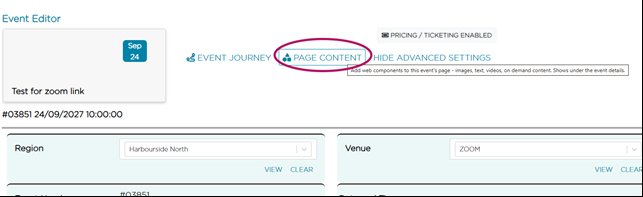
From the Event Editor, select Page Content to access the event's webpage area. You can then add and manage web components in the same way you would on a standard Mition webpage.
When to Use Page Content
Page Content is ideal for additional information and resources you want attendees to see when viewing the event online, such as:
- Speaker or presenter information
- Event resources and downloadable documents
- Images and videos
- Additional event information
- Member-only content
- Links to related resources
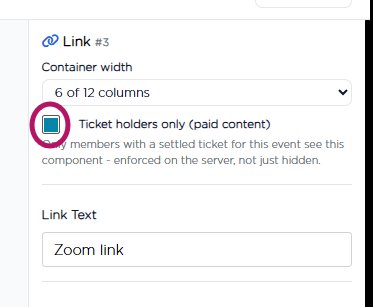
You can also configure content so that it is only visible to logged-in members, making it easy to provide member-specific information or resources without displaying them publicly.
Page Content vs Instructions
Consider how and when your attendees will need to access the information.
Use Page Content for richer supporting content that attendees can view when visiting the event page, including content you only want logged-in members to see.
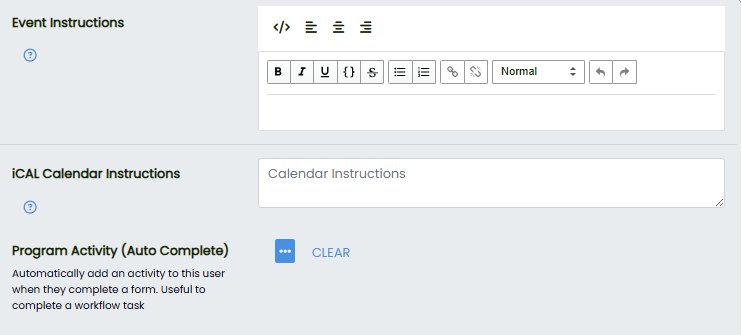
For important attendee information such as Zoom links, access details, meeting information or arrival instructions, we recommend also using the Instructions field. Instructions can be included in calendar reminders, ensuring attendees have important information readily available when they need it.
This webpage was built with Mition