Make any page into a discussion by adding the 'Discussion' component anywhere on a webpage. This enables users with access to the webpage to discuss and raise any topic.
Members can subscribe to receive notifications both when they are online and offline, ensuring they stay updated ongoing conversations.
You can optionally enable swearing protection, which automatically masks inappropriate words with **** markers, customizable to your needs.
The component also allows users to upload images and documents to share additional information, making it ideal for discussions among peers or board members.
Control access to each discussion by setting page security — for example, creating Staff Discussions, Board Discussions, or Member Discussions. Each discussion supports threaded comments to organise topics clearly.
Users have the ability to flag inappropriate behaviour in comments. Flagged content is hidden until reviewed by staff or moderators, who can then choose to override or delete the comment. This, combined with swearing protection, helps create a safe and respectful environment for your members and users.
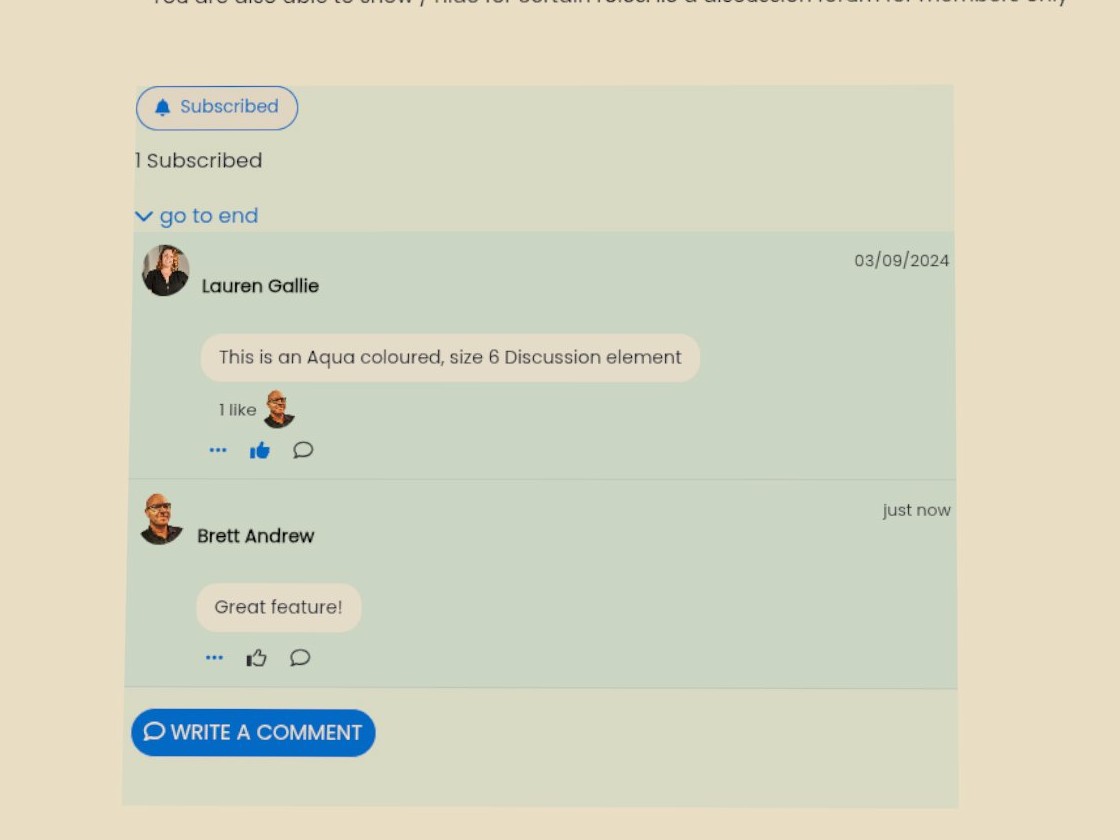
Social threads your org controls. Org wide public and internal discussions linking web, service desk, user management and events.

Payments
Bring your own Stripe or eWay merchant account, we do not collect any commissions which maximises the final revenue amounts to your organisation. Collect payments via Google Pay using Stripe. Mition supports many other types of payment methods;.
Read MoreThis webpage was built with Mition